This is a post I did for my makerspace forum a couple of years ago. As the forum is rarely used these days, I thought I would get some use out of posting this information here.
I watched a great movie about letterpress on YouTube. It was called Pressing On. I wanted to try my hand at doing some carving and block printing. While I may move up to bigger projects, this is my first foray into the subject.
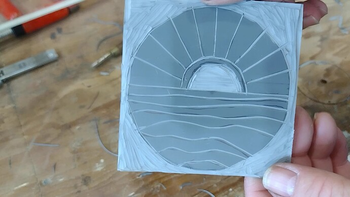
I used a website for inspiration about carving my first block. I just drew out the design on some linoleum that I bought at Hobby Lobby that is made for this process. But it really is the same stuff that is used as flooring (though much of what is sold as linoleum today is actually vinyl flooring).
Cutting the Block
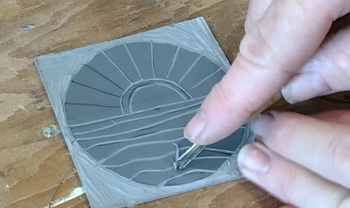
I carved away the lino block using woodworking chisels that I found at the shop. These are smaller chisels used for wood carving. There are lino specific chisels, but the ones I found worked just fine for my simple design.
Inking and Printing
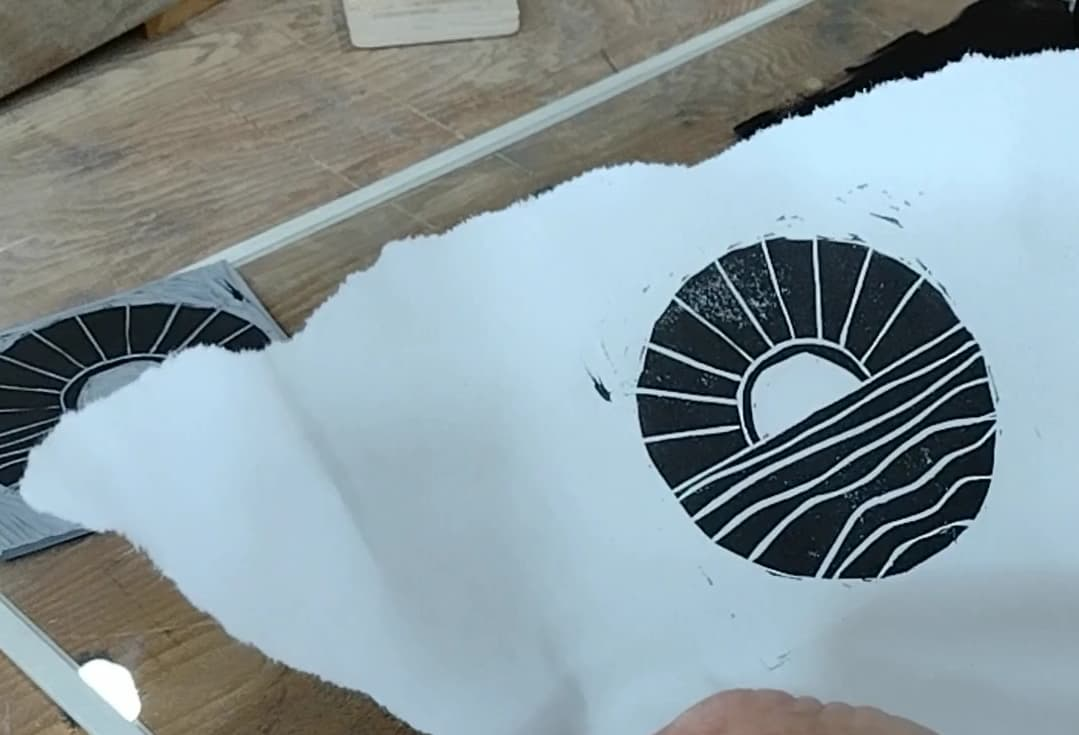
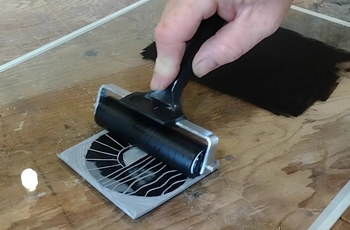
One of the things I have read about and seen videos say is that you don’t need to use as much ink as you might first think. So, I used a very small amount and found that it wasn’t quite enough to get good coverage.
I printed out several tries with the first bit of ink I laid down. The whole time I was also trying to figure out how to get a good ink transfer. You are supposed to use a tool called a baren, but when I went to the shop to work on the project, I hadn’t thought through that part yet. Many people use a spoon or something with a similar smooth, but curved surface on it.
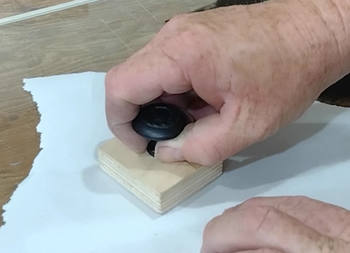
I ended up making my own baren from a block of wood and a knob I found in the cabinet hardware drawer. To make sure it didn’t rip the paper I was printing onto, I sanded it with curved edges and made it smooth.
Reprint
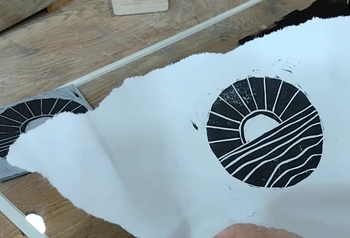
The next day I came back and tried again with a bit more ink. It turned out much better. I am using water based ink which supposedly dries faster. It is great in that it seems to dry quickly on the paper (and is easy to clean up), but it also doesn’t seem to give as much working time as the block printing videos I see where they are using an oil based ink.
Video
One thing I really don’t like doing is video editing. Somewhat because the more ignorant I am on it, the more easily I can tell people I can’t help them with a video project. But, I took the time to put together a video of the printing process. This is not meant to be a tutorial on how to do this properly. Rather just a video showing how I did it.
Next Steps
My plan is to carve another design (one that I used the laser to transfer the lines onto the lino block for me). Then maybe use the CNC machine to cut a large project for printing. This would be something that I can use as a project to let kids play with when we present at various public events.
I have a pet peeve. It starts with two words: “we should.”
“We should post more on Facebook.” “We should take pictures of what people are working on and write stories about them.” “We should start a Discord server.” “We should do video.” “We should…”
None of those are bad ideas. Some of them are really good ideas. But I’ve noticed that the person saying “we should” usually has no plans to be part of the “we.” What they mean is that somebody else should, and the somebody else they have in mind is usually whoever tends to end up doing things.
This came about because of several conversations around a non-profit that I help run. It isn’t about any particular conversation, and it isn’t only about our organization.
I call it giving someone else homework. The idea gets handed over, the person who suggested it feels like they contributed, and the actual work lands on someone else’s desk. It happens at work, at church, in clubs and volunteer groups, and at home.
What bothers me most is that there is usually nothing stopping the person from doing it themselves. Every one of us carries a phone that shoots better video and takes better pictures than equipment that cost thousands of dollars not that long ago. Anyone can contribute to a Facebook page or set up a Discord server in a few minutes. And there are free tutorials online for nearly everything. The tools are not the obstacle.
The video question
Video is one that tends to bother me the most. I have shot and edited video before. I know how much work goes into it, and I’ve done it enough to know I don’t like it.
So when someone says we should be doing video, I don’t push the idea along. I’m not against video. Video is great. I just know what it takes, and I don’t want to do it. I also don’t want to hand it to someone else just because I don’t want to do it. That would be me giving out a homework assignment, which is exactly what I’m trying to stop.
If someone loves making video and it isn’t a burden to them, I’m all for it, and I’ll help however I can to make it happen. But I’m not going to volunteer someone else for it.
Asking for help is different
I like helping people. I really do enjoy helping someone accomplish something they want to do, and I appreciate it when someone asks me to show them how. That tells me they want to do the project themselves, which is a completely different thing from “we should.”
Where I struggle is when someone wants the skill but doesn’t want to put in any effort to get it. If they haven’t tried anything or looked anything up, and they’re waiting for me to walk them through what a few minutes of searching would have shown them, it’s hard for me to get excited about teaching it. I’m glad to help someone who is stuck. I’m a lot less excited about doing the starting for them.
You have to learn it
Several years ago I heard Lýdia Machová make a point I have never forgotten: no one can teach you a language, you have to learn it.
I’m a student of both Spanish and ASL, and I believe that statement completely. A lot of people think of learning languages as something you’re either good at or not. They look at someone who speaks two or three languages and assume that person has a gift. What they don’t see is that everyone who speaks more than one language had to do the work to learn it. A teacher can guide you, correct you, and point you to good material. But nobody can put the language in your head for you.
I think the same is true of other skills. We all need help and guidance when we learn something new. But wishing a skill into existence doesn’t work, and neither does wishing a project into existence by announcing that “we should” do it.
So go do stuff
If you have an idea you want to see happen, start it. Take the pictures. Write the post. Set up the server. Shoot the video. If you get stuck, ask someone to help you. Most people who know how will be glad to help you.
But if it’s something you want done and don’t want to do yourself, think twice before you say “we should.” You might just be handing someone else your homework.
I keep coming back to the same picture: a fence line that had gone soft for a while, more propped up than fixed, until the herd finally leaned into it and it gave all at once, scattering half of them off into the dark before anybody noticed.
That’s about the closest I can get to how it felt when we lost a batch of data at the office. We got every bit of it back. What’s left is the cleanup, the systems that should have been built out before any of this happened, and that’s where I’m still working some nights, alone, after everybody else has gone home to their own beds. It isn’t stragglers I’m chasing anymore so much as fence posts, the ones that never got replaced when they needed to be, so the next storm doesn’t take the line down again.
It didn’t take long for people to hear what had happened. A fair number of them rode up long enough to tell me what I should have done to keep the fence in better shape, and then rode on.
I already knew. I could have told you the right answer before any of this ever happened, same as everybody telling me after the fact. Knowing it and doing something about it in time turned out to be two different things. I made choices along the way, trade-offs to stretch what time and resources I had a little further, and I know now some of those choices are why the fence collapsed when it did.
What helped, through all of it, were the ones who didn’t ride off again after they’d said their piece. They stayed a while. They let me tell the parts I was willing to tell and let it be hard, without trying to fix me or correct me on top of it.
Looking back, the ones who stayed were people who’ve spent a night like that themselves. Mostly folks who work in IT for a living, or folks who’ve ended up doing IT for their organization by default, because the organization either can’t or won’t pay for somebody who does it professionally. They know what it’s like to be out mending a fence by flashlight, because they’ve done it before.
If there’s a point in all this, I think it’s this: show some grace to the person who already knows what they should have done. Chances are they were stretched thin, making trade-offs they knew weren’t ideal just to keep things running, and they knew all of that long before anybody had to say it out loud.
There’s a particular kind of shame tangled up in it too. By supper time, most of the town has heard the fence came down, and plenty of them will bring it up like it’s just an interesting thing that happened, maybe even a funny one. What they don’t always see is that the one who let it get that bad is still out there after dark, setting new posts and counting what’s been found and what’s still missing, long after everybody else has gone home and gone to bed.
I’m grateful for the ones who stayed instead of riding off, and for the ones who let me be stressed about something I already felt bad enough about, instead of making sure I felt worse. And if you’re ever the one standing out there in the dark counting cows, I want to be the friend who comes and stands out there with you.
While I had done a few CNC projects using flat end mills, I had not learned the fun of v-carving. This is a method of using a v-shaped bit to make lines of varying widths by cutting deeper or shallower into the material. Typically it is used for lettering and graphics in signs.
Recently, someone contacted me and asked if I could show her how to use her CNC machine that she bought last year to make v-carved signs. I did as much study as I could through YouTube to learn about the software that came with her machine. During my time with her, I got a chance to enjoy the $700 software package that is VCarve Pro. It was fairly easy to understand and use. However, the price tag is much more than I wanted to spend for software that I might use a few times a year.
There are a few other programs that do similar things, but the one I have experience with is Easel Pro (which is the software of choice for my CNC). But at $25 a month for a feature that I might or might not use during the month, I was still left searching for something more reasonable (even if it wasn’t as easy to use).
I�m not against paying for software; especially software that could potentially help me earn money in return. It can be an investment. But, I�m not primarily looking to make money with my CNC projects. I do the projects I do mostly out of personal enjoyment.
Enter F-Engrave
I have seen F-Engrave come up as an open source option for a couple of years. But, it has also been terribly confusing for me to wrap my head around. Having enjoyed the ease of VCarve and the cool effect that v-carving can give, I had to take the time to figure this out.
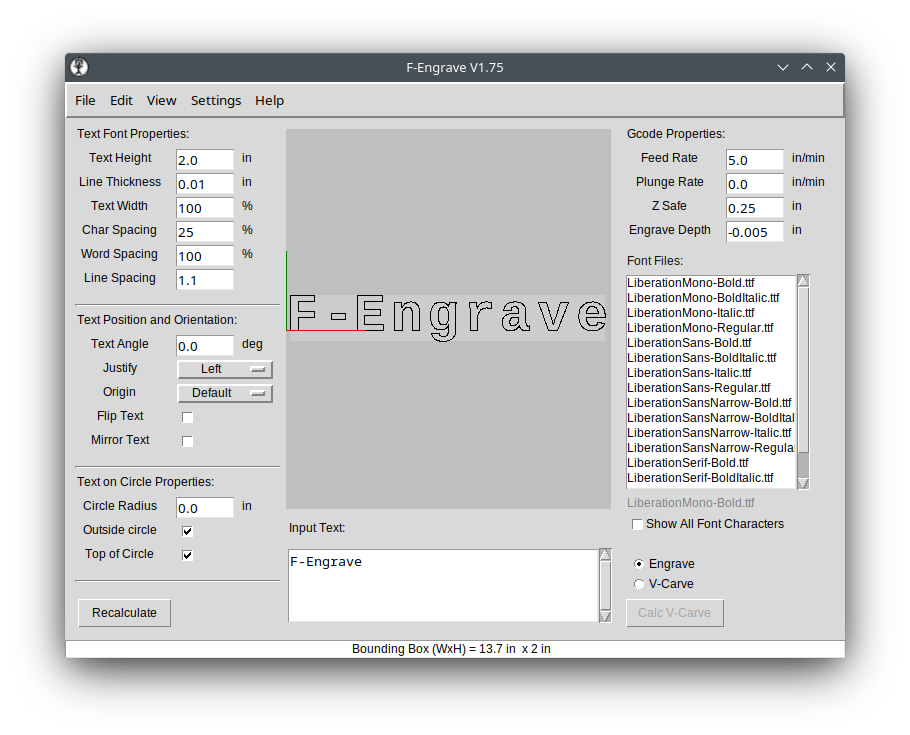
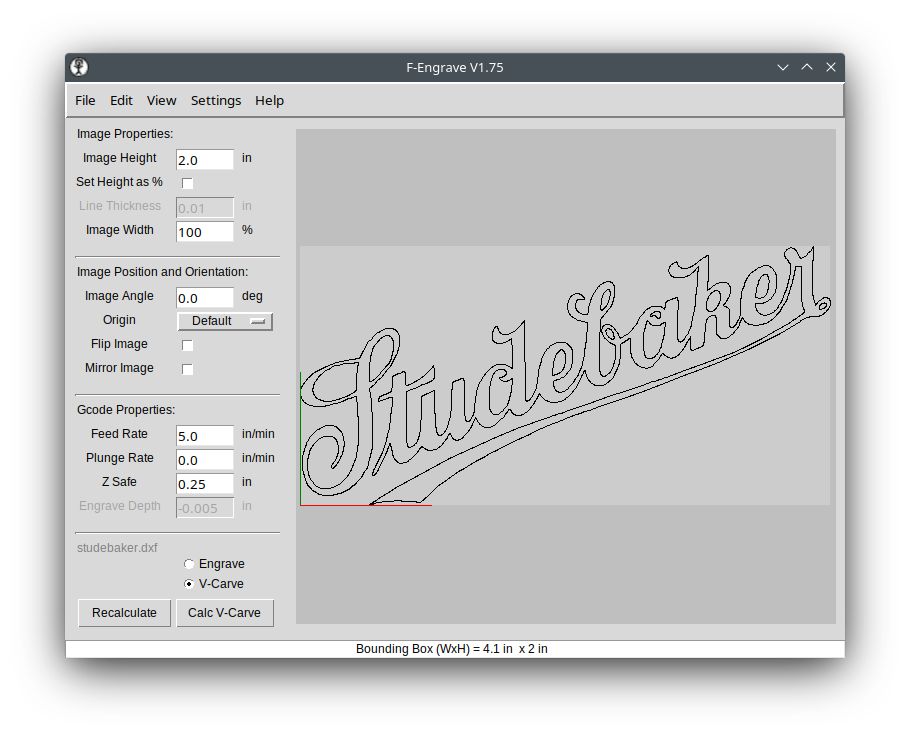
The opening screen to F-Engrave.
As is typical with open source software (I am a big fanboy), there is amazing power wrapped up in a less than stellar user interface. Front and center in F-Engrave is the ability to input text and carve it out all in one screen. However, this hides the fact that this is a powerful tool for creating intricate inlays and v-carving any design you can create in a design tool like Inkscape, CorelDraw or Adobe Illustrator.
To import your artwork, you need to have saved it in DXF format from your design software. This can be text or actual art.
You can see I imported the Studebaker logo that I created in Inkscape by clicking File | Open DXF and navigating to my art to open it.
Artwork opened in F-Engrave.
Settings Explained
Following are the settings that are needed to do a v-carve. However, I don�t completely understand every option the software has to offer. For example, everything we are doing here to create a positive v-carve can be inverted to make a perfectly fitting inlay. But I’m still trying to figure some of that out.
V-Carve Radio Box
At the bottom of the left-hand column, there is the V-Carve radio box. Select that. Even though it is the bottom of the column, it is important to choose that so that we have the correct options presented to us in the next steps.
Image Properties
Image Height is the final height of your art on the work piece. This defaults to 2 inches and is probably something that you will need to change unless you actually want your final art to be 2� tall.
Set Height as %. I am not sure why you would use this. A percentage of what?
Image Width is in percentage, but that is in relation to the height. 100% means that it will be normally proportional to the image height. Less than 100 and the image will be scrunched left to right. More than 100 and it will be stretched.
Image Position and Orientation
Image Angle is used to turn the image from horizontal to vertical or any position in between. You can play with the number and see what that does. Typically, this will be left at 0.0.
Origin is where you want to set the X0,Y0 (work home position) on your CNC machine. Typically this will be the bottom left or center of your artwork. To start your origin in the bottom left corner choose Default or Bot-Left (the same thing when using art) in the drop down menu. For a center origin choose Mid-Center.
Flip Image and Mirror Image are used for inlays. You will probably not use these for normal v-carving. You can click the check boxes to see what they do.
Gcode Properties
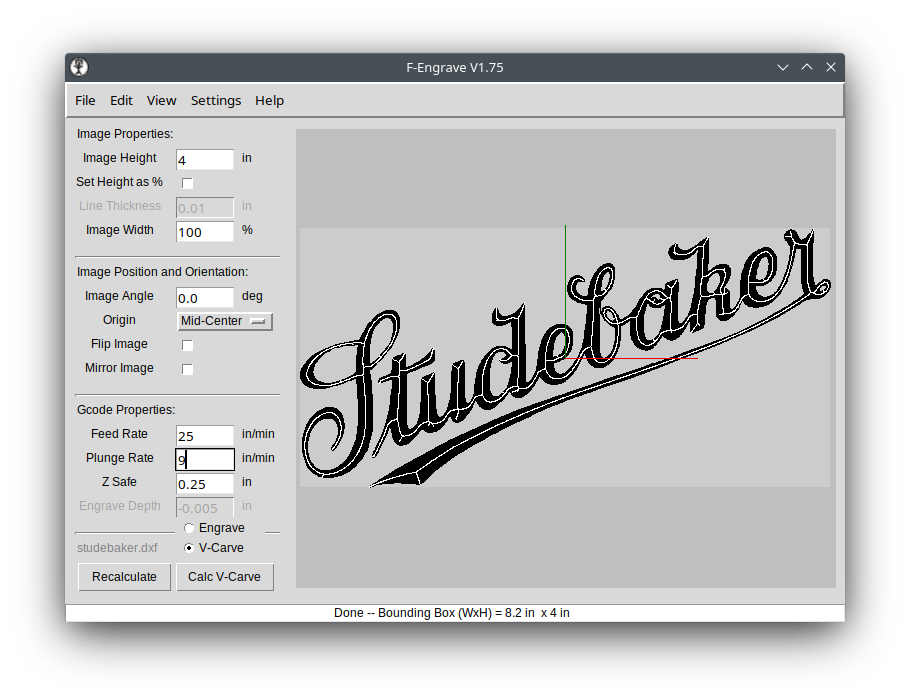
This is where you set the speed and plunge rate of your travel moves.
For wood, I have been doing 25 in/min using an X Carve machine. If your CNC is a smaller desktop version you may want to go much slower than that.
Plunge Rate should be something in the 5-10 in/min range unless you know your machine can handle something faster. The default of 0 copies whatever the feed rate is that you set in the box above.
Z Safe is how high above the work piece the machine will move before a travel move.
Calc V-Carve
At this point you can hit the Calc V-Carve button and see the results of your settings. But there is another screen we must look at before you can save your project and cut your sign.
After clicking the Calc V-Carve button.
Settings | V-Carve Settings
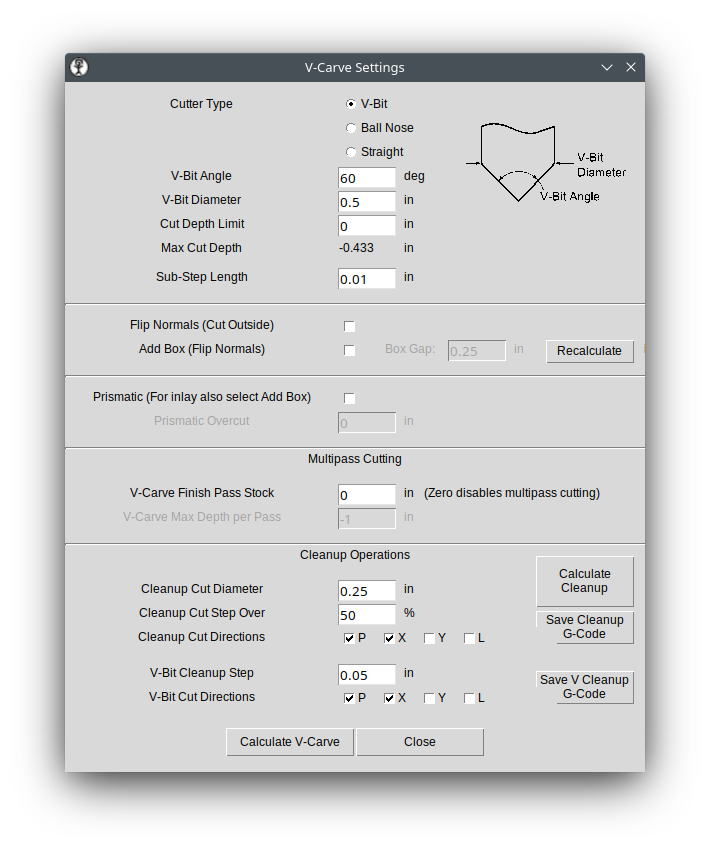
The Settings screen.
For our purposes, here are the things you need to choose and modify from the Settings screen.
Cutter Type will be a V-Bit. However, you can get similar but different results from the Ball Nose option.
V-Bit Angle is usually 90, 60, 45 or 30 degrees. Type in the angle of your bit.
V-Bit Diameter is the largest width of your bit. I usually use a �� router bit, meaning a �� shaft. But, that is not the number this option is looking for. This needs to be the size of the cutting area of the bit which will usually be larger than your bit�s shaft.
Cut Depth Limit is set to 0 by default. That means that the next line down is how deep the final cut will be. In my example it will be -0.433 inches. There is nothing you need to put in the Cut Depth Limit box unless the depth shown in the Max Cut Depth line is too deep for your material or deeper than you would like it to be.
If you need to adjust the Cut Depth Limit, then you need to type a negative number in the box.
At this point you could click the Calculate V-Carve button and be ready to save your gcode.
If Done, Save Gcode
On the main screen of F-Engrave you can click File | Save G-Code to save your code. The default file format is .ngc. That may or may not be readable by your CNC control software. If it is, then you can save the file in that format and then send it to your CNC.
In my case, my control software of choice (right now it is OpenBuildsCONTROL) does not recognize the .ngc format. But, you can also manually change the file extension to .gcode if needed. Either way, it is a simple text file that is being created.
Optional Steps
Cleanup
If, after calculating the v-carve you find that there are sections in your carve that have two white lines in a single section of the letter (like in the image below), then you will want to calculate a cleanup path.
Double white lines in the middle of an art stroke indicate you need to calculate a cleanup cut.
Go back to the Settings | V-Carve Settings screen. At the bottom right you will see a Calculate Cleanup button. Leaving the settings at their default values, you can create a cleanup path that will use a �� end mill to flatten out the bottom of the carving. Why one would need to do this only became obvious to me once I did a cut that needed it.
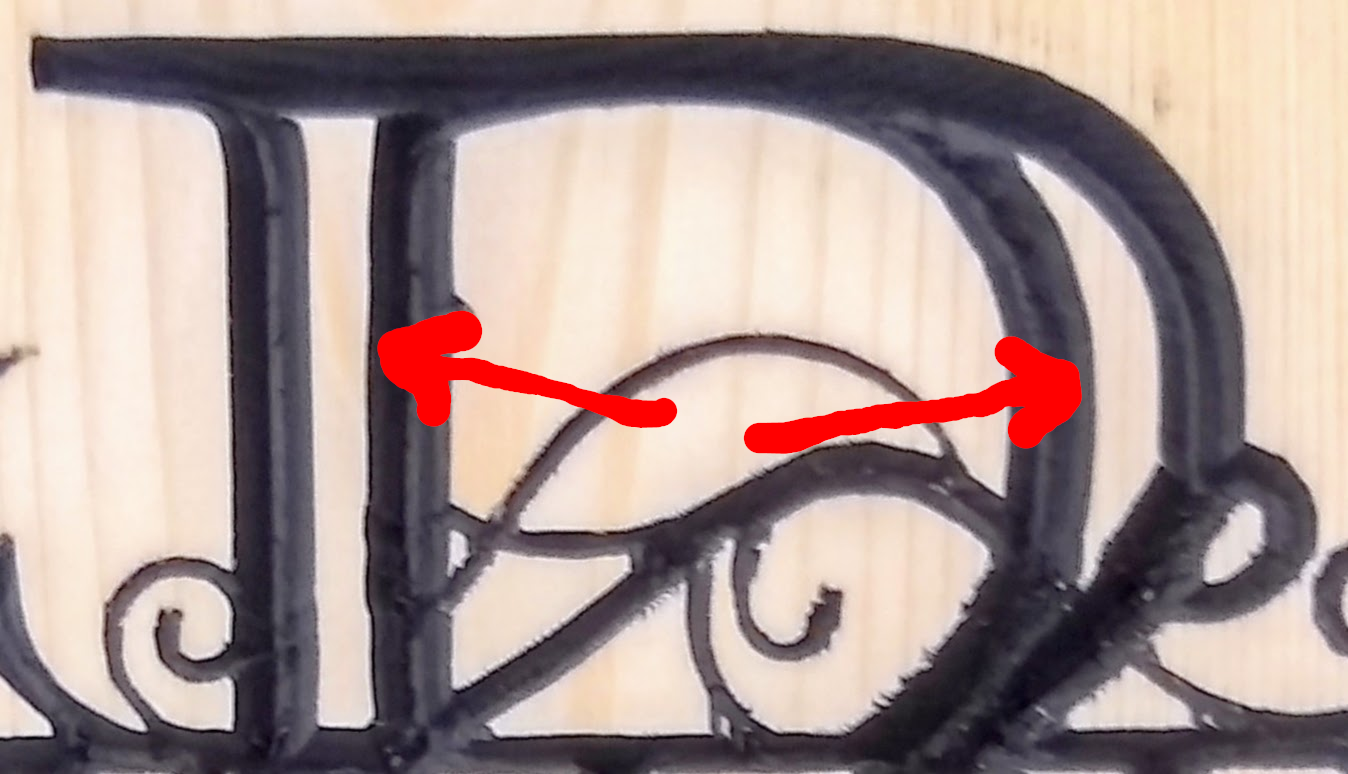
In the following image the red arrows are pointing to areas within the letter that should have been carved out during the v-carving process. However, since the letter was so wide, the bit was not able to carve out the area needed without going too deeply into the wood. This is where a cleanup toolpath will flatten out that space inside the letter.
The red arrows show the area that needs a cleanup cut performed.
After clicking the Calculate Cleanup button, click Save Cleanup G-Code and save the cleanup toolpath. Again save it as an .ngc file or .gcode file as needed.
Run the main gcode file first on your machine, then the cleanup gcode after changing to a �� bit (or whatever size you specified in the Cleanup Cut Diameter box).
Settings | General Settings
In the General Settings dialog box you can choose whether your units are inches or millimeters. All the other settings are probably important for something, but I have yet to figure them out. You may need to adjust the G Code Header and G Code Postscript for your machine. I was fairly successful in finding what those fields do by searching on Google.
Actually controlling and sending the code to your machine is beyond what I can do here and keep this general enough for all machines.
Other Features
The other great thing that F-Engrave can do, that I do not yet understand, is inlays. You are able to cut the inverse of the v-carve that we just did in another piece of wood and glue them together for a perfect match. Explaining that will have to wait until I get tired of this process and am ready to spend the time to learn the workflow. There are videos on this process, I just haven�t been able to wrap my head around the steps.
As mentioned at the beginning, I have done a video on the v-carving process that may be a bit easier for you to follow.
I had a power supply that was suspected as faulty at my office. I put together a voltage divider on an Arduino with an SD card data logger to keep track of the voltage coming out of the unit. See the caveats at the end to learn why this can’t be the only test you do.
It turned out, in this case, that the problem was the UPS the computer was plugged into. The battery was fully charged and had sufficient capacity. But the unit would randomly act like an electrical failure had occurred but would not make the switch to battery power. We experience frequent short power losses at our office (on average more than 1 a week). It is likely that the unit has been damaged by these regular power failures over the years that it has been in place. Fortunately, it is the unit that is shielding the computer from taking the hit on this.
This is one of those blog posts that I’m really writing for myself so that I can come back and find out how I did something if I need to do this again in the future. I’m just inviting the public to read over my shoulder.
Building a Power Supply Monitor
I had not previously worked with monitoring voltage with an Arduino, but I knew it was possible. I also knew that the answer was by using a voltage divider. However, I didn’t know how they worked, so I had a little studying to do. I understand the math behind it, but I still haven’t wrapped my head around what is actually happening electronically. Mostly it is because it works and I haven’t really tried to understand it.
Why Use a Voltage Divider
The need for a voltage divider is so that you can feed a higher voltage into an analog pin of the Arduino without destroying the Arduino. The analog pin can only take 5V in. Any more than that and you will destroy the unit (how much more makes it melt down is unknown by me, but I suspect it wouldn’t take much).
Since I wanted to measure the 12V output of the power supply, I needed to step down 12V to no more than 5V. But I didn’t want to use a voltage regulator that would give me a smooth 5V out. If I did that then I’m not actually monitoring the power supply output. I needed a way to vary the 5V going into the Arduino in relationship to how much the 12V fluctuates.
I could have measured the 5V or 3.3V outputs of the power supply, but I didn’t think those would have as much fluctuation as the 12V might if there was a problem with the supply. While those would have been simpler, and potentially not needed a voltage divider, if the 5V or 3.3V outputs spiked over 5V then it would have destroyed the Arduino. And, since I suspected there was a problem with the supply, I worked under the assumption that they might be spike over their intended voltage.
Voltage Divider Concept
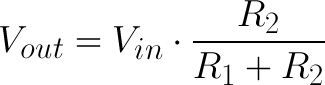
The idea of the divider is that you can feed in 12V (or, in the way I set mine up, anything up to 48V) and it will proportionally divide the supply voltage down to less than 5V. Any fluctuation in the input voltage affects the output voltage. In this way you can monitor voltage drops or spikes safely with a 5V tolerant analog pin of an Arduino.
The math is fairly simple. As you can see from the image above the output voltage is equal to voltage in times the value of resistor2 divided by resistor1 and resistor2 added together. There are calculators online that can do the math for you based on resistors you have available. The key is that you never want your output voltage to go over 5V. Therefore you should add in a bit of a buffer in case the voltage at your supply spikes for some reason.
In my case I wanted my output voltage to never be greater than 5V. I had a handful of resistors that I measured with a continuity tester. What worked for me was a 33K (which measured out to 32.7K) and a 3.9K (measured at 3.8K) resistor which would give me a 48V input max. I would have liked my tolerance to be a bit lower (20V) so that I felt like I got more resolution on my final reading, but these were the resistors I had handy.
Code
Here’s the code that I used. The original author of the code is T.K.Hareendran that I got from the ElectroSchematics website. I have modified it to work for my project and therefore have taken his name off of it. But it might be beneficial to read his site on how it works or if you want to add an LCD display to the unit.
#include
#include

File myFile;

int pinCS = 10;
int analogInput = A0;
float vout = 0.0;
float vin = 0.0;
float R1 = 32700.0; // resistance of R1 (32.7K)
float R2 = 3800.0; // resistance of R2 (3.8K)
int value = 0;

void setup() {
  Serial.begin(9600);
  pinMode(analogInput, INPUT);
  pinMode(pinCS, OUTPUT);
  if (SD.begin()) {
    Serial.println("SD card is ready to use.");
  } else
  {
    Serial.println("SD card initialization failed.");
    return;
  }
  Serial.println("DC VOLTMETER");
}

void loop() {
  // read the value at analog input
  value = analogRead(analogInput);
  vout = (value * 5.0) / 1024.0; // Analog input reads voltage as a percentage from 0-1024
  vin = vout / (R2 / (R1 + R2));
  if (vin < 0.09) {
    vin = 0.0; //statement to quash undesired reading !
    //analogInput = analogRead(0);
  }
  Serial.println(vin);

  //Create or Open file
  myFile = SD.open("Voltage.txt", FILE_WRITE);

  if (myFile) {
    myFile.println(vin);
    myFile.close();
  } else
  {
    Serial.println("Error opening test.txt");
  }
  delay(1000);
}
Caveat
This is not a perfect solution for several reasons, but it does (potentially) give enough information that can help me know for certain that the power supply is faulty. However, it can't tell me that it is not faulty because this particular power supply has 3 independent 12V outputs. A whole section of the supply can die and not affect the other 2. If I'm testing a good section there still could be 2 others that are faulty.
The problem, in this case, ended up being a bad UPS. However, if I had monitored this power supply for a few days I may still not have caught a true power supply problem. This circuit can really only tell me if the supply is faulty. It can't determine if it is definitively good. And, it may not present as faulty on the output I'm using during the test period. Therefore, there are plenty of ways that this circuit may not detect a faulty supply and it can never convince me that the supply is definitely not faulty. It only tests a small subset of potential power supply problems.
Conclusion
While, as mentioned, it cannot tell me if a supply is absolutely good, it does give me a chance to test the supply under load. That is one of the reasons I have not invested in a particular type of power supply tester---you can't test under load.
This does, however, help explain how a voltage divider can be used and how to read a higher voltage using an Arduino that is limited to 5V input. And, maybe, in the future when I need to remember how to use a voltage divider I will remember that I wrote this down and I don't have to go searching all over the Internet again for the solution.